Intrusion Panel Integration

Miletech Galaxy Plugin

Seamless integration of Honeywell Galaxy intrusion alarm panels with Milestone XProtect, monitor, control and automate from a single platform.

520
Max Zones
32
Groups
260
Outputs
6
Languages

Plugin Features

Everything you need to bring Galaxy panels into the XProtect ecosystem.

Arm & Disarm Groups

Set, part-set or unset any Galaxy group directly from Smart Client — including map context menus and operator interactions.

Smart Client Maps

Drag-and-drop Galaxy panels, groups, zones and outputs onto XProtect maps with real-time state icons and right-click control menus.

Real-Time Alarms

Zone activations, tampers, panel faults and more stream as XProtect events — triggering alarm rules, camera recordings and email alerts.

Output Control

Activate or deactivate Galaxy outputs from the Smart Client — trigger sirens, locks, lights and other connected devices.

Zone Monitoring

Track every zone state: open, closed, tamper, fault, bypassed. Supports contact, PIR, fire, gas, glass-break, panic, seismic and many more zone types.

Auto-Import Configuration

Automatically read panel configuration — groups, zones, outputs and descriptions — directly from the Galaxy controller via SIA protocol. No manual data entry.

Supported Galaxy Models

Compatible with the full Honeywell Galaxy Dimension range.

Model Zones Groups Outputs Ethernet RS-232
GD-48 48 8 16 Coming soon
GD-96 96 16 32 Coming soon
GD-264 264 32 130 Coming soon
GD-520 520 32 260 Coming soon
Flex 20 20 4 8 Coming soon Coming soon
Flex 50 50 8 16 Coming soon Coming soon
Flex 100 100 16 32 Coming soon Coming soon

See It in Action

Screenshots from the Management Client and Smart Client integration.

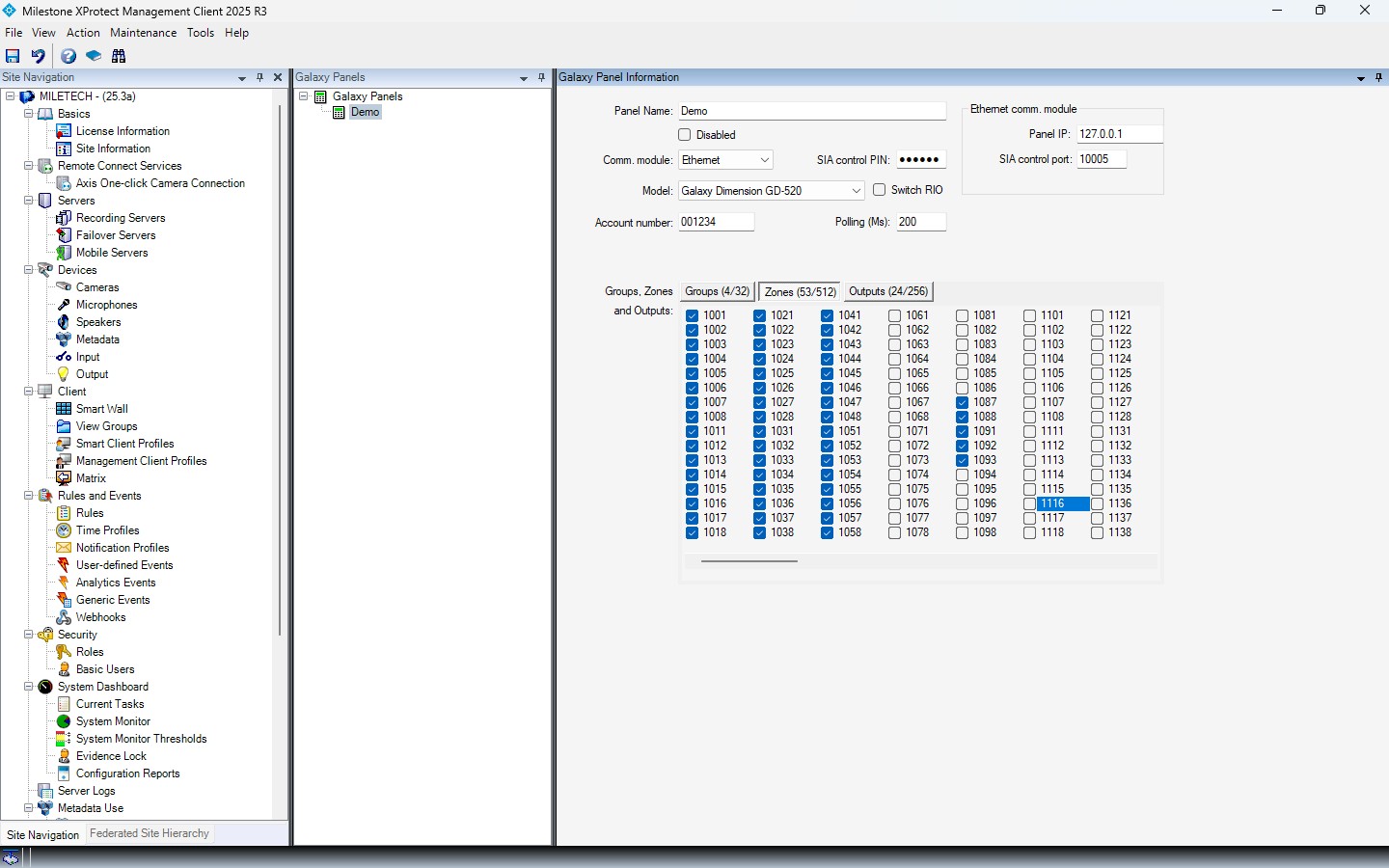
Management Client configuration
Management Client — Controller configuration
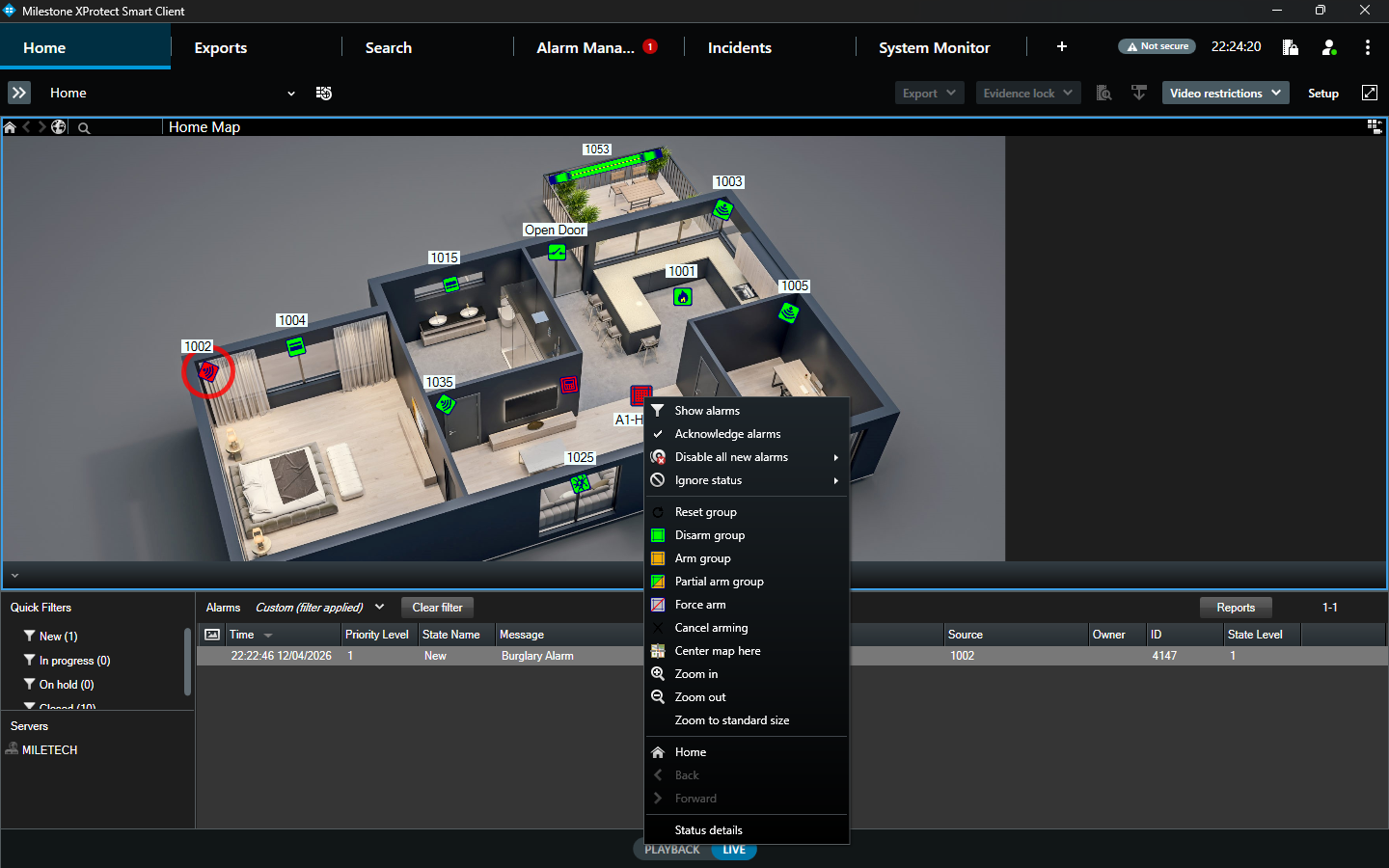
Smart Client map view
Smart Client — Map with Galaxy zones & groups
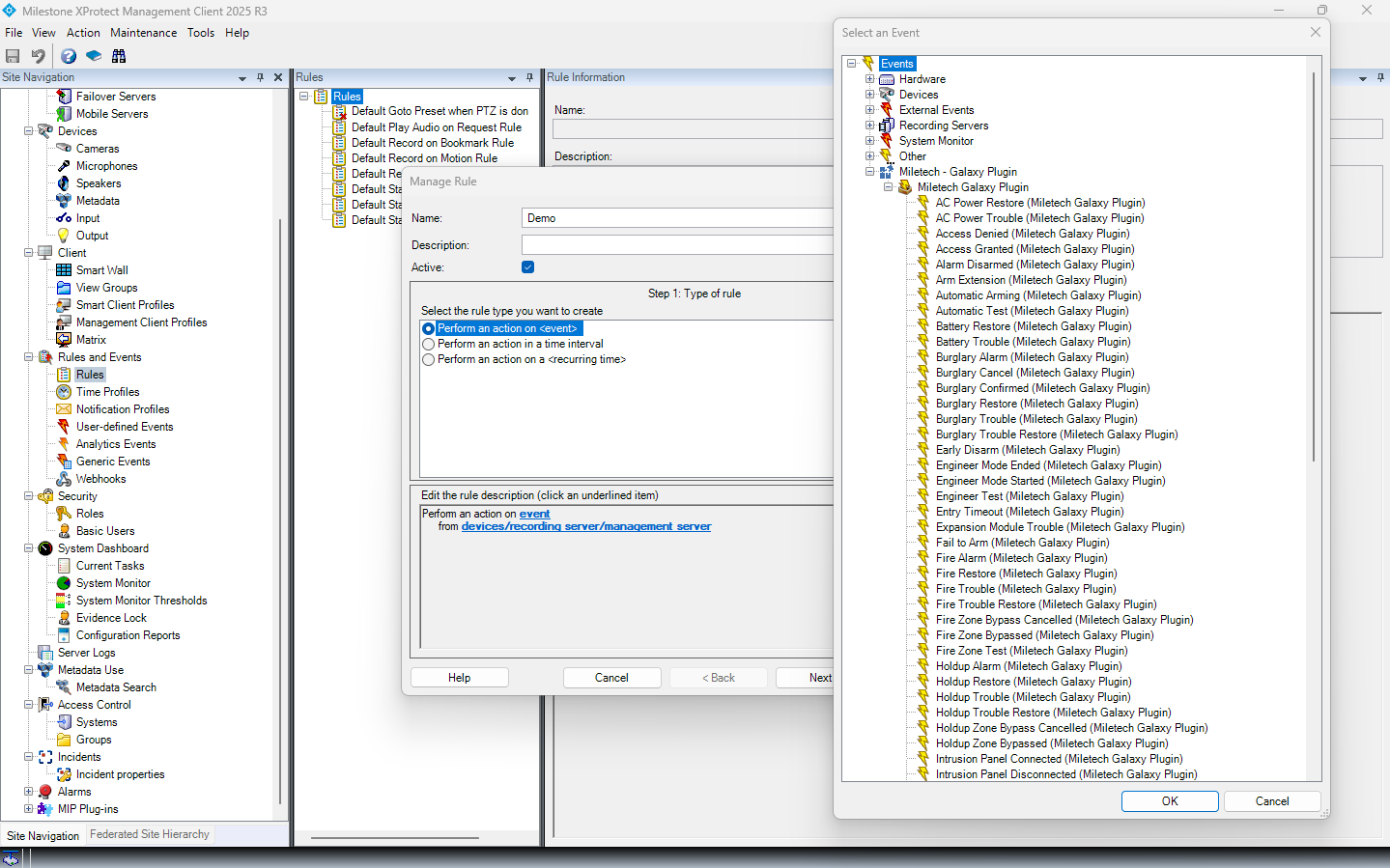
Alarm list in XProtect
XProtect Alarm Manager with Galaxy events
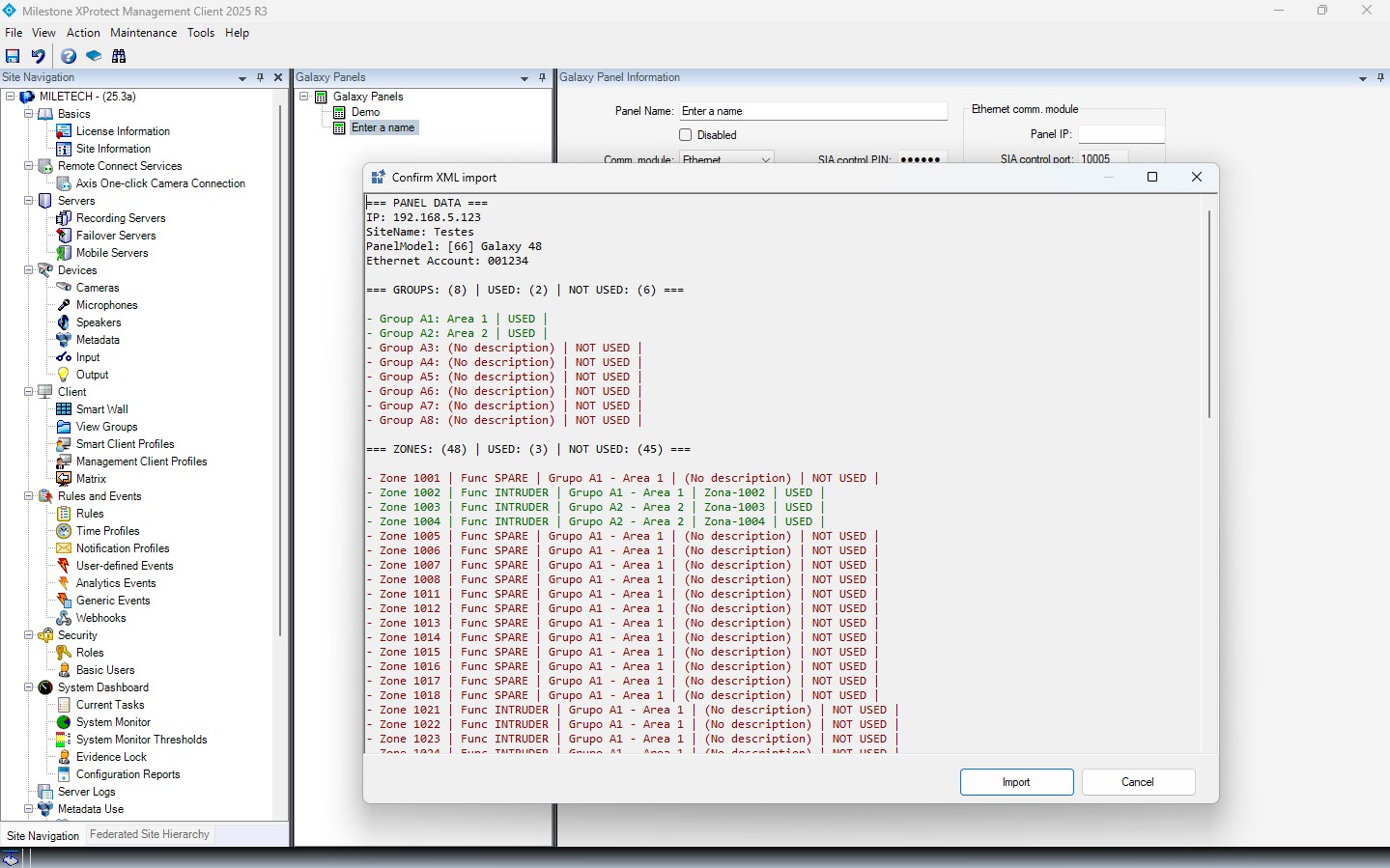
Auto-import wizard
Auto-import panel configuration wizard

Technical Details

Built on the Milestone Integration Platform (MIP) SDK.

Communication

SIA protocol over TCP/IP (Ethernet module) or RS-232 (serial via COM port). Automatic session management with reconnection logic, configurable polling intervals and separate fault/login retry counters.

XProtect Integration Points

Event Server background plugin for real-time polling. Management Client node for configuration. Smart Client map icons with context menus for operator control. Full XProtect Rule Engine support.

Requirements

Milestone XProtect 2022 R1 or later. Windows Server 2019/2022. Galaxy panel with Ethernet (E080) communication module and SIA enabled.

Licensing

Per-controller license, tied to machine hardware. Free 30-day trial included. Activation via license file — no internet connection required on the server.

Frequently Asked Questions

Common questions about the Galaxy Plugin installation, licensing and operation.

Which XProtect editions are supported?
The plugin requires Milestone XProtect edition (2022 R1 or later).
How does the plugin communicate with the Galaxy panel?
Communication uses the SIA protocol — either over TCP/IP via the Galaxy Ethernet module (E080-10 or similar), or via RS-232 serial connection. The plugin runs a dedicated polling engine in the XProtect Event Server that maintains a persistent session with each configured panel, polling zone states, group statuses and output states in real time.
Can I connect multiple Galaxy panels?
Yes. Each panel is configured as a separate controller in the Management Client. You can connect as many panels as your licence allows — each panel requires its own licence key. All panels appear in a unified tree structure and can be placed on the same Smart Client maps.
What happens if the network connection drops?
The plugin includes automatic reconnection logic with configurable retry intervals. Network failures and authentication failures are tracked separately to prevent one type of issue from escalating the other. When a connection is lost, an "Intrusion Panel Disconnected" event is raised in XProtect — which you can use to trigger alarm rules. The connection is automatically re-established once the network recovers.
How does licensing work?
Licences are per-controller and tied to the machine hardware (via a secure fingerprint). A free 30-day trial is included with every installation. After the trial, you activate with a licence file — no internet connection is required on the server. Purchase licence keys from our online shop.
Can operators arm/disarm groups from the Smart Client?
Yes. Operators can Set (arm), Part-Set and Unset (disarm) Galaxy groups via right-click context menus on map icons. These actions are subject to XProtect user permissions — administrators can restrict which operators are authorised to perform control actions on a per-entity basis.
Does the plugin support XProtect alarm rules?
All Galaxy events (zone alarms, tampers, panel faults, group state changes, etc.) are raised as native XProtect events. You can use them in the Rule Engine to trigger camera recordings, send email notifications, activate outputs, display alarms in the Alarm Manager and more — exactly like built-in XProtect events.
How do I install the plugin?
Run the installer (.exe), which places the plugin DLL into the MIPPlugins folder. After installation, restart the Milestone services (Event Server and Management Client). The plugin will appear in the Management Client sidebar, ready for configuration. A step-by-step installation guide is included with every download.

Ready to integrate Galaxy with XProtect?

Purchase a license or request a free 30-day trial to get started.